
AAC Keyboard Suggestions for Spellers & Older Adults | TalkingTiles
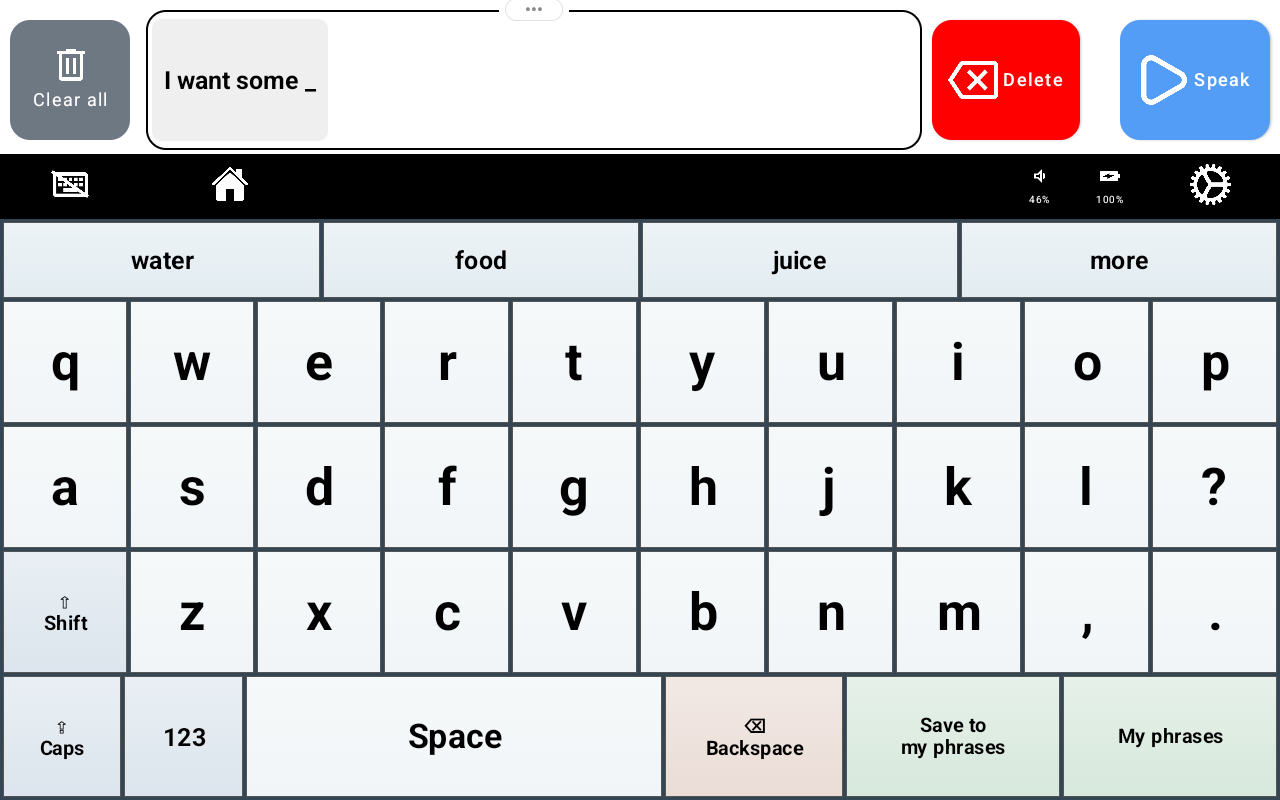
AAC keyboard suggestions help people who spell build spoken messages with fewer individual letter selections when a suggested word matches what they want to say. TalkingTiles AAC combines a touchscreen keyboard with word suggestions that learn from use over time, helping the experience become more relevant to the communicator.
For confident spellers, adults with speech difficulties, and older adults who prefer typing, the goal is straightforward: more support for expressing their own thoughts. Suggestions offer choices; the person decides what goes into the message.
Looking for a dedicated communication device? Shop TalkingTiles AAC and explore your options.
What are AAC keyboard suggestions?
AAC stands for augmentative and alternative communication. A text-based AAC keyboard lets a person spell a message and use speech output to share it. Keyboard suggestions place candidate words within reach so the person can select a whole word when it fits, rather than entering every letter.
In the screenshot, the message begins “I want some,” and the suggestion row offers “water,” “food,” “juice,” and “more.” These are options, not a decision made on the communicator’s behalf. They can select the word they want or continue typing something else, then use Speak to share the message.
A keyboard that learns and improves suggestions over time
TalkingTiles keyboard suggestions learn from use and adapt over time. As the communicator continues using the keyboard, the suggestions can become better suited to their language use. This personalization is designed to make the suggestion row more useful during everyday communication.
That matters because people do not all talk about the same things. A learner discussing favorite activities and an older adult sharing preferences or talking with family may need very different vocabulary. An adaptive keyboard creates room for those differences instead of treating every communicator’s language as identical.
Learning over time does not mean the keyboard will always predict the right word. Keep typing whenever a suggestion does not match the intended message. The value is having helpful choices available while preserving the freedom to say something new.
Why word prediction can help spellers
People who can spell may want to create messages beyond a fixed set of picture tiles or saved phrases. A keyboard offers that flexibility, while suggestions can reduce repeated letter selections. This can be useful when entering each letter takes effort or when a frequently used word appears in the suggestion row.
Imagine composing a familiar request. If the desired word appears, the communicator can choose it; if it does not, they can spell it. Both routes belong to the same communication process. There is no need to use a prediction simply because it is available.
The keyboard also includes “Save to my phrases” and “My phrases,” giving users access to reusable messages alongside spelling. Suggestions and saved phrases serve different purposes: one offers words during composition, while the other provides a place for messages the person wants to use again.
Want both spelling and picture-based communication in one device? Explore TalkingTiles AAC devices.
AAC keyboard suggestions for older adults
Older adults who have difficulty speaking may still have plenty to say. For someone who can read, spell, and select words comfortably, typed AAC can provide another way to participate in conversations. A keyboard may feel familiar and offer space for personal messages, questions, humor, and preferences.
AAC is used across the lifespan. ASHA’s AAC Practice Portal includes acquired communication needs associated with conditions such as stroke and progressive neurological disease. Whether keyboard-based AAC is suitable depends on the person’s language, reading, vision, motor abilities, and preferred access method—not age alone.
For an older adult, try meaningful messages first: a preferred drink, a question for a family member, or an activity they enjoy. Allow time to review the suggestions and compose the message. When communication abilities change, a speech-language pathologist can help match the system and support to the person.
What does research say about AAC word prediction?
ASHA identifies word and phrase prediction as rate-enhancement tools within alphabet-based AAC. The underlying idea is to reduce the amount of input needed to compose a message. Prediction can be useful, but its practical benefit depends on how well the suggestions fit and how easy they are to find and select.
In The Effects of Word Prediction on Communication Rate for AAC, Trnka and colleagues (2007) compared typing without prediction with basic and advanced prediction. Seventeen adults without motor, visual, or cognitive impairments used an interface with an artificial key-entry delay to simulate slower input. Advanced prediction produced greater keystroke savings and faster message entry than the other conditions.
The study also found a tradeoff: reviewing and choosing predictions took time. Better suggestions reduced enough typing effort to offset that cost in the study. This supports the importance of useful predictions, while explaining why fewer taps do not automatically mean faster communication for every person.
These findings concern word prediction generally. They are not a clinical test of TalkingTiles, an evaluation of its adaptive learning feature, or evidence of a specific benefit for all older adults. TalkingTiles applies the same practical aim: offer relevant words while leaving the communicator in control.
How to get started with TalkingTiles keyboard suggestions
Begin with a message the communicator actually wants to share. Enter the first words, review the suggestion row, and select a word only if it fits. Continue spelling when needed, review the finished message, and use Speak to share it. Practice during real conversations, with partners who wait for the person to finish.
As the keyboard is used over time, notice whether the suggestions are becoming useful for everyday messages. Judge success by the communicator’s comfort and ability to express what they mean, rather than by how often they choose predictions.
Frequently asked questions
Does the TalkingTiles keyboard learn over time?
Yes. Its suggestions learn from use and adapt over time, with the aim of making suggested words more relevant to the communicator. Individual suggestions may still need to be ignored or replaced by typing.
Can someone type a word that is not suggested?
Yes. Suggestions are optional shortcuts. The keyboard remains available for spelling words and composing an original message.
Is this feature only for children?
No. Keyboard-based AAC can be useful to spellers across ages, including adults and older adults whose abilities and preferences suit text-based communication.
Will word prediction always make communication faster?
No. Helpful predictions can save letter selections, but finding and selecting them also takes time. The benefit depends on the person, the task, and how relevant the suggestions are.
Find an AAC device with room for their words
TalkingTiles AAC brings keyboard suggestions, spelling, speech output, and saved phrases into a dedicated communication device. Explore a setup that gives your learner or loved one more ways to express their own ideas.
Research and further reading
Trnka, K., Yarrington, D., McCaw, J., McCoy, K. F., & Pennington, C. (2007). The Effects of Word Prediction on Communication Rate for AAC. Proceedings of NAACL HLT, short papers, 173–176.