
AAC Scanning for Autism, ALS & Cerebral Palsy | TalkingTiles
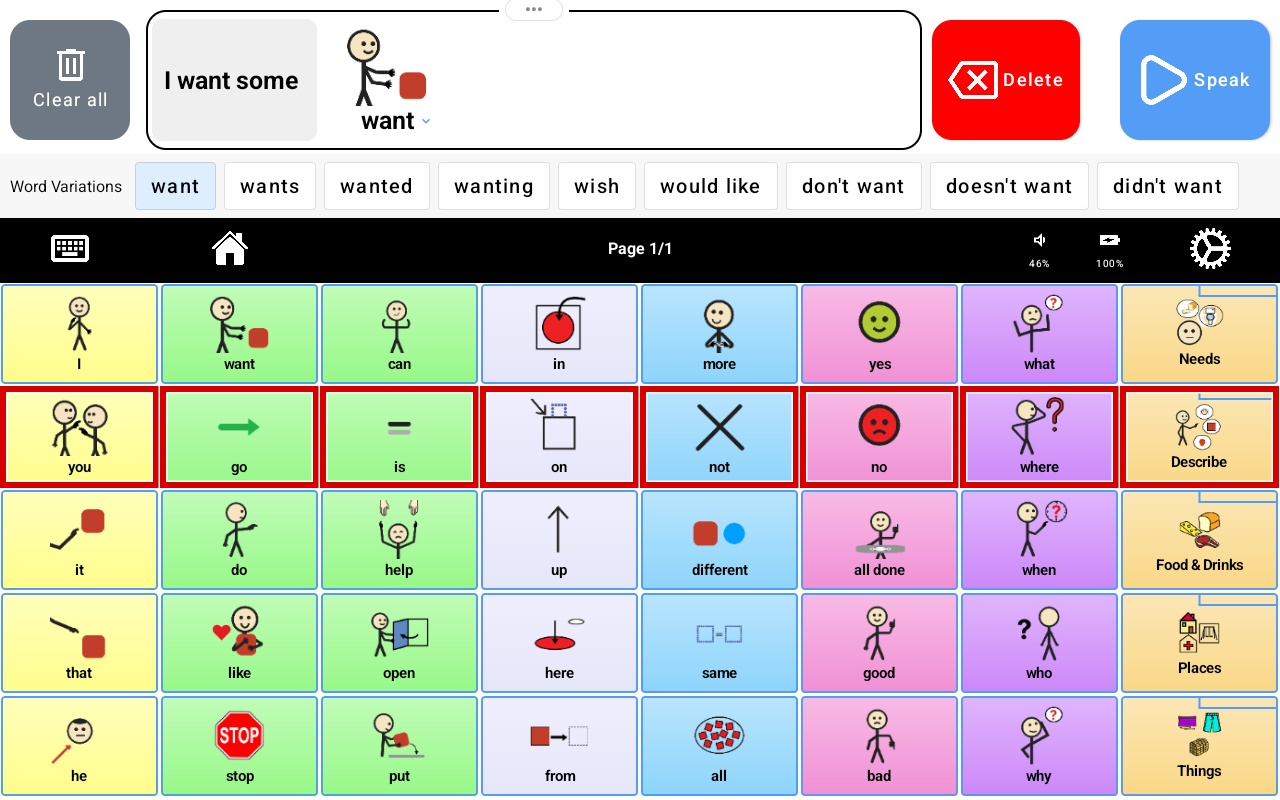
AAC scanning offers another way to select communication messages when precisely tapping individual tiles is difficult. For some people with autism spectrum disorder (ASD), amyotrophic lateral sclerosis (ALS), or cerebral palsy (CP), motor challenges can affect how comfortably they use a touchscreen—even when they know exactly what they want to say.
TalkingTiles AAC scanning supports selection with or without an external switch. A communicator can tap anywhere on the screen to select the highlighted scanning choice, or use a compatible switch. The aim is to reduce the need to reach and accurately target each individual tile.
Looking for a communication device with flexible access? Explore TalkingTiles AAC devices and accessibility accessories.
What is AAC scanning?
AAC means augmentative and alternative communication. Scanning is an indirect selection method: choices are presented in sequence, and the communicator activates a selection when the desired choice is highlighted. Instead of pointing directly to a particular word or symbol, they follow the scanning highlight and use a repeatable action to choose.
The screenshot shows a row outlined in red. This visible focus helps the communicator follow which choices are being scanned. Scanning still requires attention and timing, so a useful setup depends on the person’s abilities, preferences, positioning, and practice.
Why motor challenges can affect touchscreen communication
Direct touch asks the user to reach the screen, target a tile, and activate it accurately. Weakness, involuntary movement, difficulty coordinating a reach, or fatigue can make that task harder. An access difficulty is not evidence that the person has nothing to communicate.
The right question is practical: which movement can the person use comfortably and consistently? A broader screen tap or a large physical button may be easier than selecting a small target. Others may prefer direct touch or need a different access technology.
AAC scanning for autism and motor coordination differences
Some autistic people experience motor coordination difficulties alongside communication differences. A systematic review and meta-analysis of motor impairments in children with ASD examined the prevalence and nature of these difficulties. This supports considering motor access during AAC assessment, rather than assuming every autistic learner can reliably point to individual tiles.
For an autistic person who finds precise tile selection difficult, scanning may offer another route to the same communication vocabulary. It should be considered because it fits that person’s access needs, not simply because they have an autism diagnosis. Many autistic communicators prefer and use direct touch successfully.
AAC scanning for ALS: adapting access as movement changes
ALS can affect speech and limb movement, and access needs may change over time. A person who comfortably types or taps today may later find reaching or precise targeting more tiring. Planning alternative access early can help the person and their communication partners explore options before the current method becomes difficult.
McLaughlin and colleagues’ guidance on AAC access in late-stage ALS discusses switch scanning, eye tracking, and other access methods. It emphasizes individualized decisions as movement changes. TalkingTiles scanning may be an option when a person can reliably activate a screen tap or compatible switch; it is not a substitute for assessing other access methods when that movement becomes unreliable.
AAC scanning for cerebral palsy (CP)
People with cerebral palsy have varied movement and communication abilities. For some, coordinating an accurate reach toward a specific tile may be difficult. For others, direct touch is an effective and preferred option. Scanning is one access method to explore when targeting individual symbols is a barrier.
ASHA’s AAC Practice Portal emphasizes matching access to physical and motor abilities, positioning, vision, and communication needs. An SLP, occupational therapist, or assistive technology professional can help identify a comfortable activation method and device position.
Want to compare a dedicated AAC device and an optional switch? Visit the TalkingTiles shop.
TalkingTiles scanning without a switch: tap anywhere
You do not need to purchase an external switch to use TalkingTiles scanning. In scanning mode, the communicator can tap anywhere on the screen to select the highlighted scanning choice. This changes the task from reaching for a particular tile to activating the screen at the appropriate moment.
Tap-anywhere access may suit someone who can make a repeatable screen tap but finds accurate targeting difficult. It still requires reaching the screen and coordinating selection with the highlight. Try it with meaningful messages and allow time for the person to learn the interaction.
TalkingTiles switch scanning: use a large physical button
A compatible external switch provides a physical selection action. The person watches the scan and activates the switch when the desired choice is highlighted. A switch can be useful when pressing one accessible button is more comfortable or reliable than reaching the touchscreen.
Place the switch where the communicator can activate it consistently without an awkward reach. Consider accidental presses, fatigue, and whether the switch can stay stable during use. A bigger button can offer a larger activation target, but it does not automatically make scanning easier for everyone.
Add the TalkingTiles USB-C accessibility switch
TalkingTiles also sells a USB-C accessibility switch with a large button surface. It is an optional accessory for people who benefit from a physical selection button during scanning. The pictured product connects through USB-C and is advertised without a separate switch interface, Bluetooth pairing, or replacement batteries.
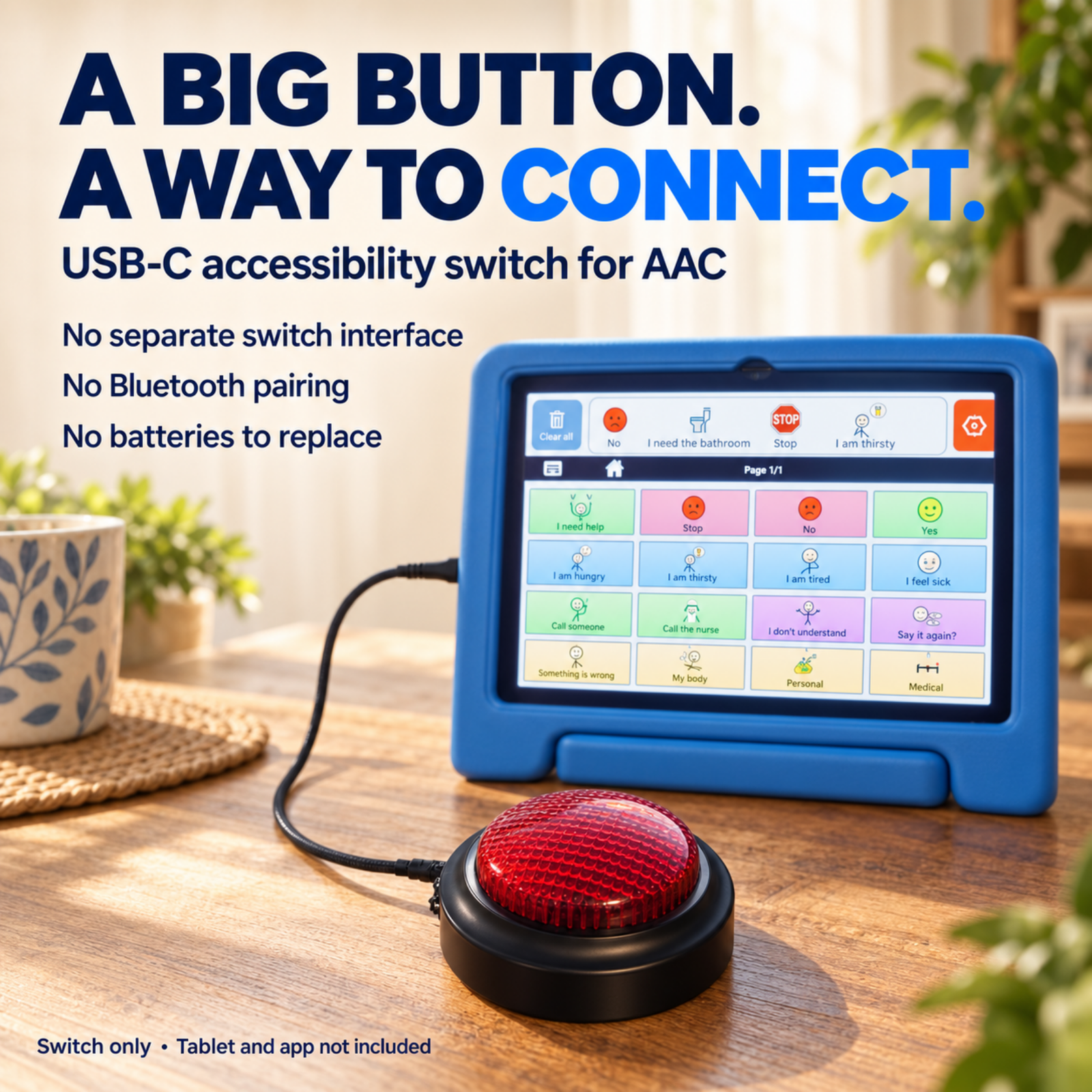
The switch is sold separately; the tablet and app are not included. Confirm compatibility with your device and choose the switch around the communicator’s movement and positioning needs.
Building a scanning setup? Shop the TalkingTiles AAC device and add the USB-C accessibility switch if a physical button fits your learner or loved one’s access needs.
What research supports scanning and switch access?
ASHA describes scanning as an established indirect selection technique that can use a switch or another agreed activation. Its guidance also explains the tradeoff: scanning can require less precise motor control than direct selection, while placing demands on attention and working memory. That is why individual assessment and practice matter.
The ALS access guidance above shows why alternative access should be reviewed as abilities change. The autism motor review supports assessing motor differences when present. These sources support the broader principles of AAC access; they do not demonstrate a clinical outcome for TalkingTiles or show that scanning is the best method for every person with ASD, ALS, or CP.
Getting started with AAC scanning
Start with a message the person wants to communicate. Position the tablet where the highlight is easy to see, choose screen tapping or a compatible switch, and practice making selections. Observe comfort, missed choices, unintended activations, and fatigue. Give the communicator time to finish, and adjust the setup with their feedback.
Success means the person can express what they intend with an access method that works for them. Keep another communication option available while learning or whenever the device is unavailable. For changing motor needs, review the setup with the communication team.
Frequently asked questions about AAC scanning
Can TalkingTiles scanning work without a switch?
Yes. The communicator can tap anywhere on the screen to select the highlighted scanning choice. A compatible external switch is an alternative, not a requirement.
Who may benefit from switch-access AAC?
A person who can reliably activate a physical button but finds direct touchscreen targeting difficult may benefit. This can include some people with ASD, ALS, cerebral palsy, or other motor challenges. Suitability depends on the person’s access abilities, not the diagnosis alone.
Does scanning always make communication faster?
No. Scanning involves waiting for choices and timing selections. Its value may be improved access and more reliable selection rather than speed. Direct touch can be preferable when it is comfortable and accurate.
Is the accessibility switch included with the tablet?
The switch pictured here is sold separately. Its product image specifies switch only, with the tablet and app not included. You can explore the device and accessory in the TalkingTiles shop.
Research and further reading
ASHA: Augmentative and Alternative Communication Practice Portal—direct and indirect selection, motor access assessment, and individual feature matching.
Motor Impairments in Children with Autism Spectrum Disorder: A Systematic Review and Meta-analysis—research on motor challenges in autistic children.
McLaughlin et al. (2021): Decision-Making for Access to AAC Technologies in Late Stage ALS—clinical guidance on changing access needs and alternative methods.
Find an AAC setup that fits their movement
Explore TalkingTiles AAC for scanning with or without a switch. Choose your device, and add the USB-C accessibility switch when a large physical button is the right fit. More ways to access communication mean more room for their words and choices.