
• Home
  • Buy Now
  • Why
  • About
  • Research
  • Help Center
  • Home
  • Buy Now
  • Why
  • About
  • Research
  • Help Center
  • Home
  • Buy Now
  • Why
  • About
  • Research
  • Help Center
Buy Now

Getting started

3
  • Quick start guide
  • Device Manual
  • Troubleshooting

Customization guides

6
  • Editing buttons/tiles
  • Organizing vocabulary
  • Customizing Folders and Pages
  • Accessibility settings
  • Backup & Restore
  • Setting Up for a Specific Learner

For SLPs & School Staff

5
  • Implementation Guide for SLPs and School Teams
  • Classroom Setup Tips
  • Modeling Tips
  • Vocabulary Consistency Tips
  • Caregiver/Staff Handoff Sheet

Best-practice setup examples

4
  • Recommended Starter Boards
  • School-Aged Student Setup Examples
  • How to Keep Vocabulary Consistent Between Home and School
  • How to Train Paraprofessionals, Teachers, and Family Members

How to tips

9
  • How to Add a Picture to Your Tiles/Button
  • How to Create a New Tile Button in TalkingTiles AAC
  • How to Upload a Custom Image to Your AAC
  • How to Add a Folder (Category) to Your AAC Device
  • How to change the grid size for your AAC board
  • How to adjust keyboard layout in your AAC board
  • How to coach your learner on the location of a certain button on your AAC board
  • Enabling Gammatical Support For Core Buttons
  • Build Vocabulary Over Time
View Categories

How to adjust keyboard layout in your AAC board

< 1 min read

Some learners prefer to spell words using the built-in accessibility keyboard in your TalkingTiles AAC. The keyboard comes with both QWERTY and ABC layout,s which you can switch from/to based on your learner’s preference.

  • To bring up the keyboard, from your home screen, tap the “keyboard” button from the top navigation bar
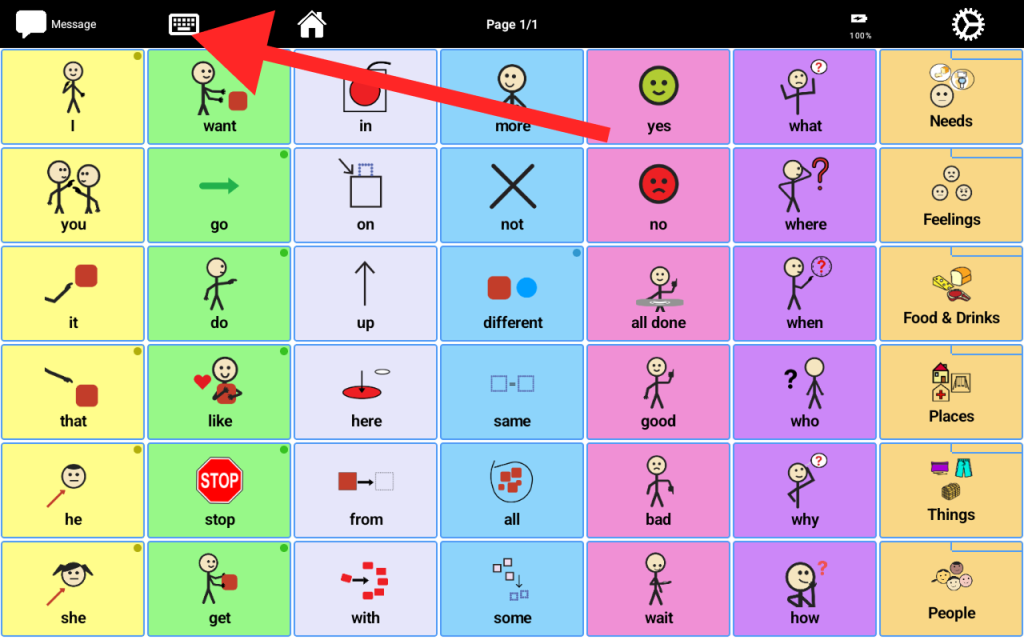
To change your keyboard layout, tap on the “settings” button the top right corner.

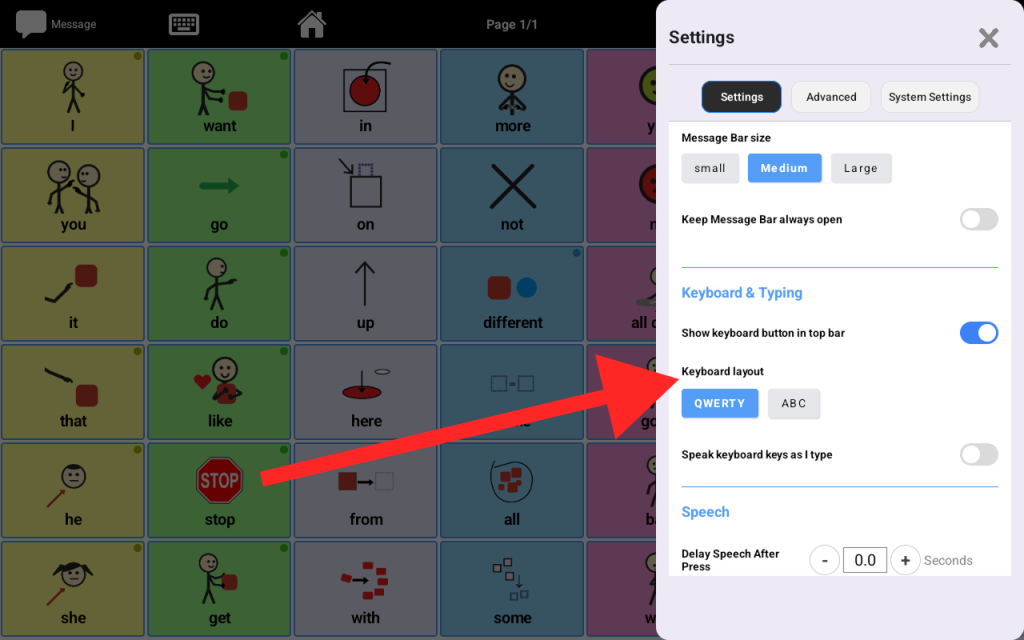
  • While the “Settings” tab is selected (highlighted in black), scroll down till you find the “Keyboard & Typing” section
  • From there, you can choose between QWERTY and ABC layouts.
  • You may also toggle the “Speak keyboard key as I type” to allow the keyboard to speak the keys aloud as your learner types.
Share This Article :

  • Facebook
  • X
  • LinkedIn
  • Pinterest

Start Communicating Today

Get Your AAC Now

Contact us

support@talking-tiles.com

  • Home
  • Buy Now
  • Why
  • About
  • Research
  • Help Center

Copyright © 2025 TalkingTiles AAC

Meet TalkingTiles: an Augmentative and Alternative Communication (AAC) tablet designed to help children with speech and communication challenges express themselves.

Facebook-f Tiktok Youtube