
• Home
  • Buy Now
  • Why
  • About
  • Research
  • Help Center
  • Home
  • Buy Now
  • Why
  • About
  • Research
  • Help Center
  • Home
  • Buy Now
  • Why
  • About
  • Research
  • Help Center
Buy Now

Getting started

3
  • Quick start guide
  • Device Manual
  • Troubleshooting

Customization guides

6
  • Editing buttons/tiles
  • Organizing vocabulary
  • Customizing Folders and Pages
  • Accessibility settings
  • Backup & Restore
  • Setting Up for a Specific Learner

For SLPs & School Staff

5
  • Implementation Guide for SLPs and School Teams
  • Classroom Setup Tips
  • Modeling Tips
  • Vocabulary Consistency Tips
  • Caregiver/Staff Handoff Sheet

Best-practice setup examples

4
  • Recommended Starter Boards
  • School-Aged Student Setup Examples
  • How to Keep Vocabulary Consistent Between Home and School
  • How to Train Paraprofessionals, Teachers, and Family Members

How to tips

9
  • How to Add a Picture to Your Tiles/Button
  • How to Create a New Tile Button in TalkingTiles AAC
  • How to Upload a Custom Image to Your AAC
  • How to Add a Folder (Category) to Your AAC Device
  • How to change the grid size for your AAC board
  • How to adjust keyboard layout in your AAC board
  • How to coach your learner on the location of a certain button on your AAC board
  • Enabling Gammatical Support For Core Buttons
  • Build Vocabulary Over Time
View Categories

Enabling Gammatical Support For Core Buttons

< 1 min read

Grammar Helpers adds a long-press menu to supported core words, giving access to grammar variations such as different verb tenses and related word forms.
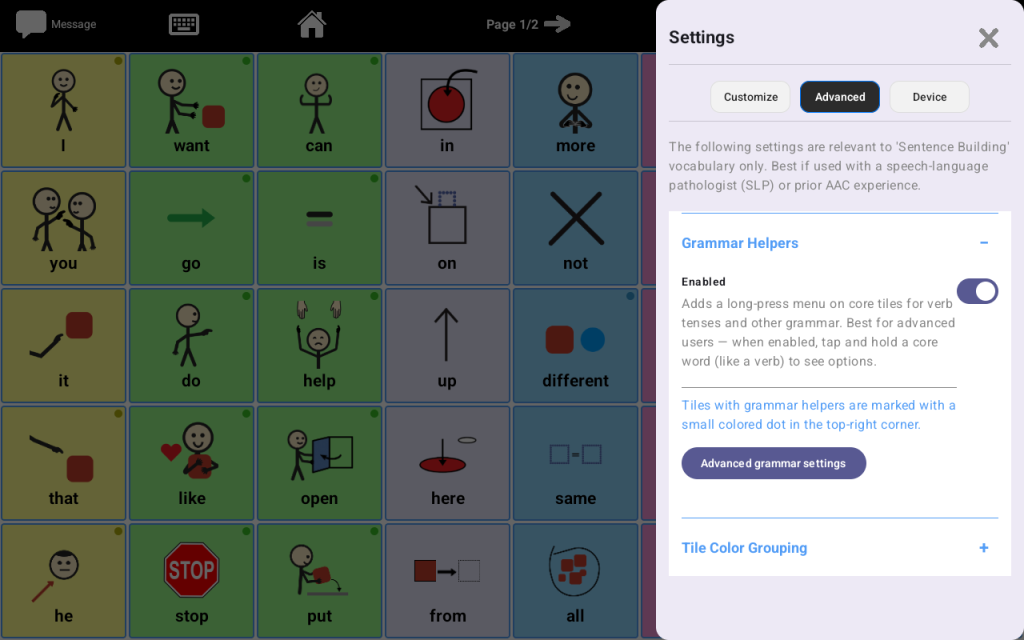
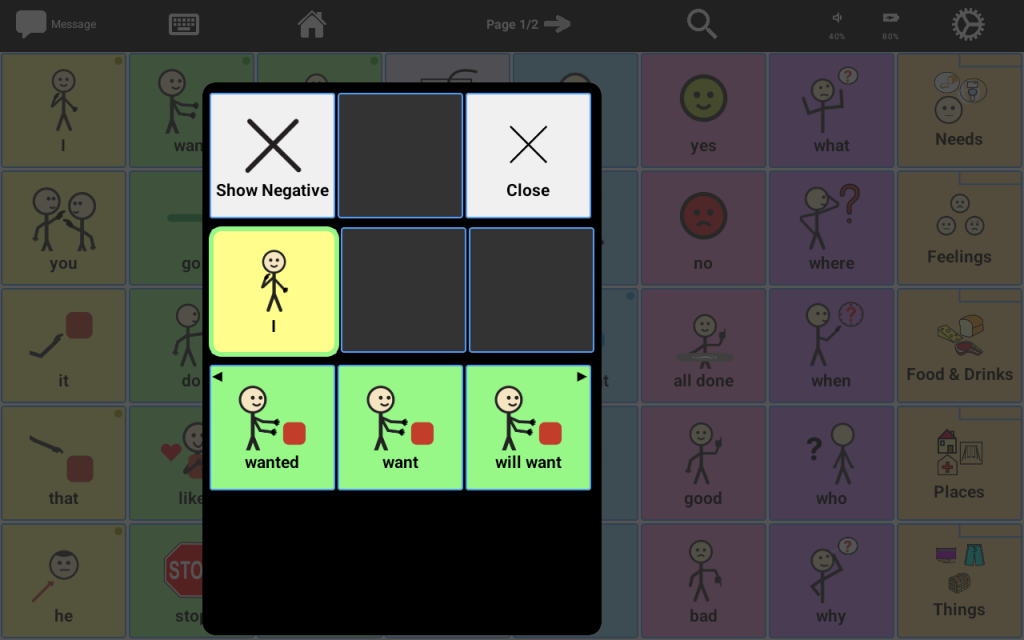
When this feature is turned on, the user can press and hold certain core tiles to see more language options without taking up extra space on the main board.

How it works

  • Supported core tiles show a small colored dot in the top-right corner
  • Press and hold one of these tiles to open grammar options
  • Available options may include forms such as different tenses or related grammar choices

Best for

  • Users who are already combining words
  • Learners ready for more advanced language
  • Communication partners who want to support sentence growth without changing the main layout too much

Important
This feature is usually best for more advanced AAC users. If the learner is just getting started, it may be better to leave this off until they are comfortable with the main board.

Share This Article :

  • Facebook
  • X
  • LinkedIn
  • Pinterest

Start Communicating Today

Get Your AAC Now

Contact us

support@talking-tiles.com

  • Home
  • Buy Now
  • Why
  • About
  • Research
  • Help Center

Copyright © 2025 TalkingTiles AAC

Meet TalkingTiles: an Augmentative and Alternative Communication (AAC) tablet designed to help children with speech and communication challenges express themselves.

Facebook-f Tiktok Youtube